How can I see exactly what happened on a delivery day, minute by minute?
Short answer
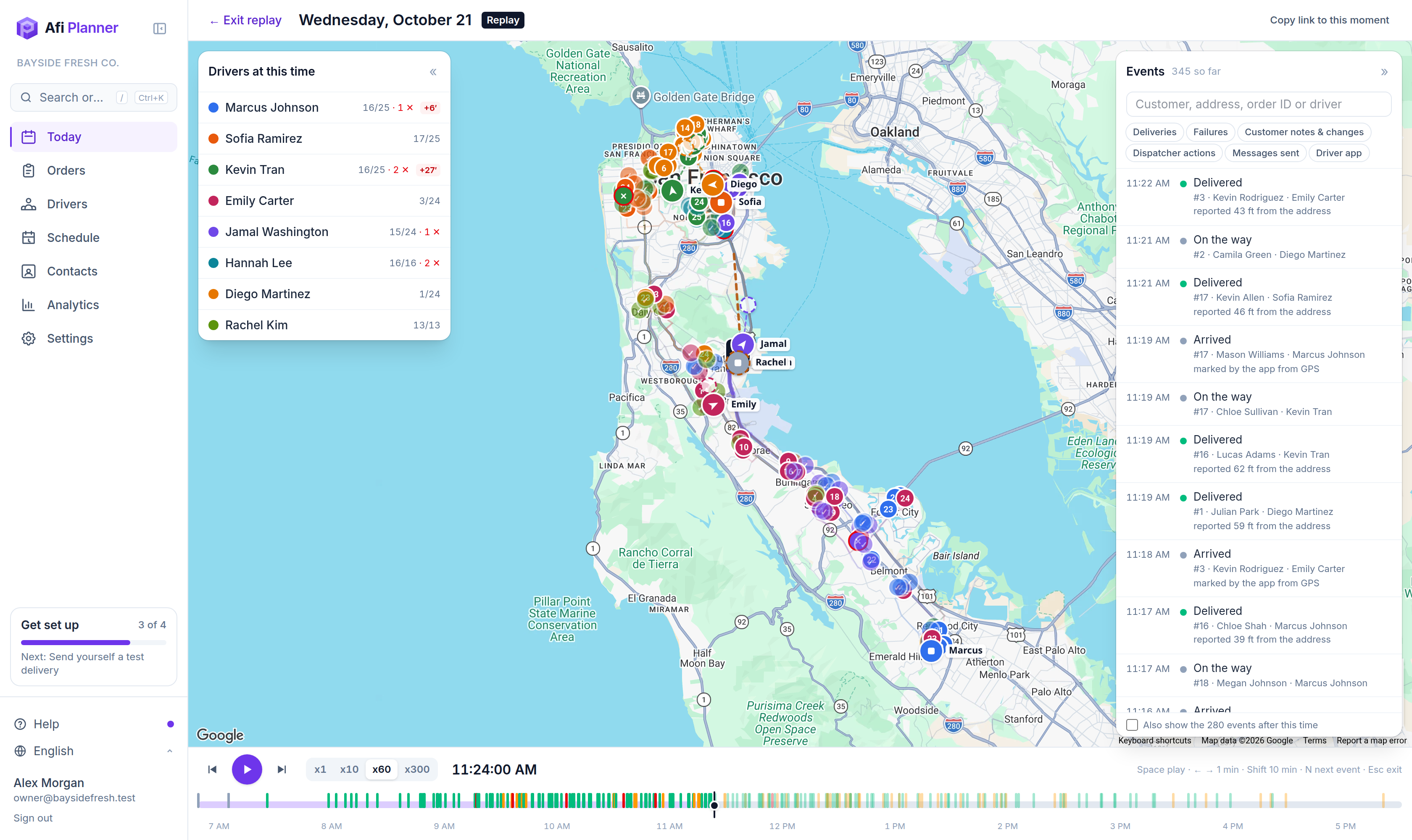
Open the day in Afi Planner and click ▶ Replay. Every van moves along its real GPS track, each stop turns delivered or failed at the minute the driver reported it, and the map shows the routes as they stood at that minute, so a change made at noon shows from noon. The events list says who did what, down to the dispatcher who moved an order from one driver to another.
How it works in Afi Planner
Every van and every stop, at any minute
Vans move along their real GPS tracks with a 15-minute trail, and a hollow “ghost” shows where the plan put each driver, so lateness is plain to see. Play at x1, x10, x60 or x300, drag to any minute, or press N to jump to the next event.
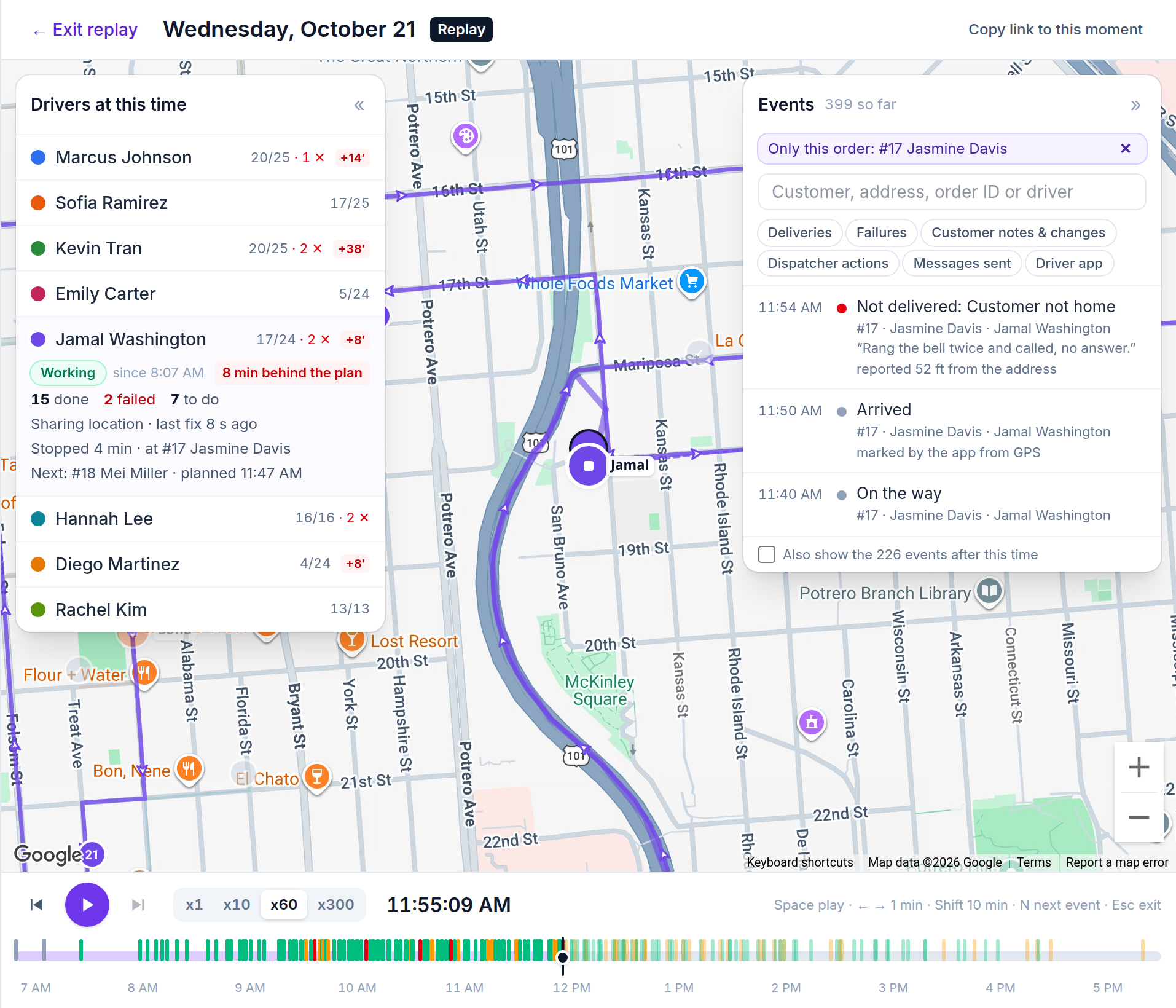
- Each driver at that moment: working or not, “Stopped 4 min · at #17”, minutes behind the plan, stops done, failed and to do, and the next stop
- Any day whose routes were sent, today or earlier; Live follows today as it happens
- Copy link to this moment sends a teammate the same minute
The routes as they were, and who changed them
Every time routes or updates are sent, Afi Planner keeps that version. The replay draws the routes and the stop order that were in force at the minute you are looking at, and the plan’s ghost follows them. The events list puts the dispatchers’ actions next to the drivers’ reports.
- Routes sent, updates sent, and when each driver opened the updated route
- Orders moved between drivers, with who moved them: “Moved from Jamal Washington to Emily Carter (by Maria)”
- A route handed over to another driver, a driver who can’t continue and resumes
- Needs attention items taken (“On it”), snoozed and resolved, by whom
- Customers who changed their instructions, asked for another day or rated the delivery, and the messages they were sent
Answer “the driver never came” in a minute
Open the order’s story and click Replay the day at this order. The replay starts just before the first report on that order, with its driver’s route in front and only that order’s events: on the way, arrived, then the delivery, or the failure with the driver’s reason, note and how far from the address it was reported.
Try it in the live demo
A fictional delivery company in the middle of its day. Read-only, no sign-up.
Open the live demo →Feature
Dispatch & live tracking
Send routes to drivers in one click, follow every van on a live map, and get warned before a delivery runs late. Live ETAs from driver GPS and a “Needs attention” inbox your whole team shares.
7 steps · 3 min read
Replay a day: see where every van was, minute by minute
Frequently asked questions
How long are driver locations kept?
Every GPS point for 7 days, then a simplified track for 90 days, which is what Replay shows after the first week. A summary of each route (miles and time driven) is kept for analytics. A day older than 90 days still replays its events and stop statuses, without the vans.
Can customer service use the replay?
Yes. They open it from the order’s story, and nothing can be changed from a replay.
Does the order’s history show who moved it?
Yes. The order’s story lists the move with the two drivers and who made it, and an order moved to another day says who moved it.
More answers
- How do I add new orders after my drivers have already left?
- Is there one list of everything a dispatcher needs to act on during the day?
- Can my customers track their delivery with a live ETA and see proof of delivery?
- Does the driver app work without a signal?
- How do I import delivery orders from Excel or CSV without mixing up the dates?
- Does Afi Planner have an API with webhooks?
Plan tomorrow’s routes in the next 3 minutes
Start your free 3-month trial. No credit card, no setup call, no installation.