How do I add new orders after my drivers have already left?
Short answer
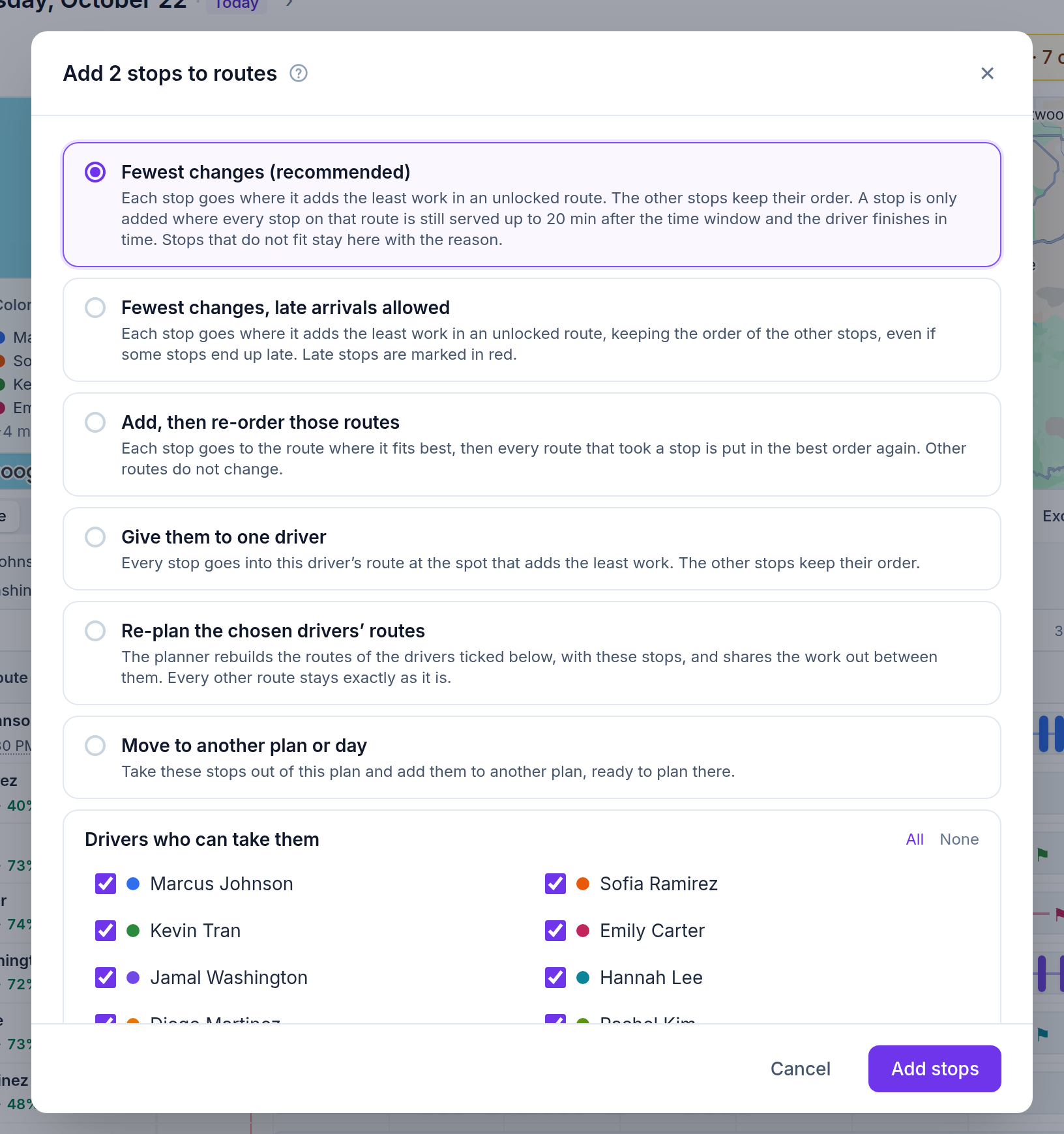
In Afi Planner, orders added after the routes were planned show up as “New since planning” on the day. Click it and choose Fewest changes: each order goes into the unlocked route where it adds the least work, the other stops keep their order, and it is only added where every stop on that route is still served on time and the driver finishes in time. The parcel is still at the depot, so the order starts with “Pick up at: depot”, and drivers hear about it only when you click Send updates.
How it works in Afi Planner
Fewest changes, or the option that fits
The “New since planning” chip in the day header counts the orders added after the routes were planned, whether they were typed in, imported or sent through the API. Nothing is added or sent until a dispatcher says so. The dialog offers one recommended way and the alternatives, and you untick the drivers who should not take the new stops.
- Fewest changes (recommended): the least extra work, other stops keep their order, every stop stays inside its window or the lateness you allow
- Fewest changes, late arrivals allowed: the same, even if some stops end up late; late stops are marked in red
- Add, then re-order those routes: only the routes that took a stop are put in the best order again
- Give them to one driver, or re-plan only the drivers you tick; every other route stays exactly as it is
- Stops that do not fit stay off the routes with the reason
The parcel is at the depot, and the plan knows it
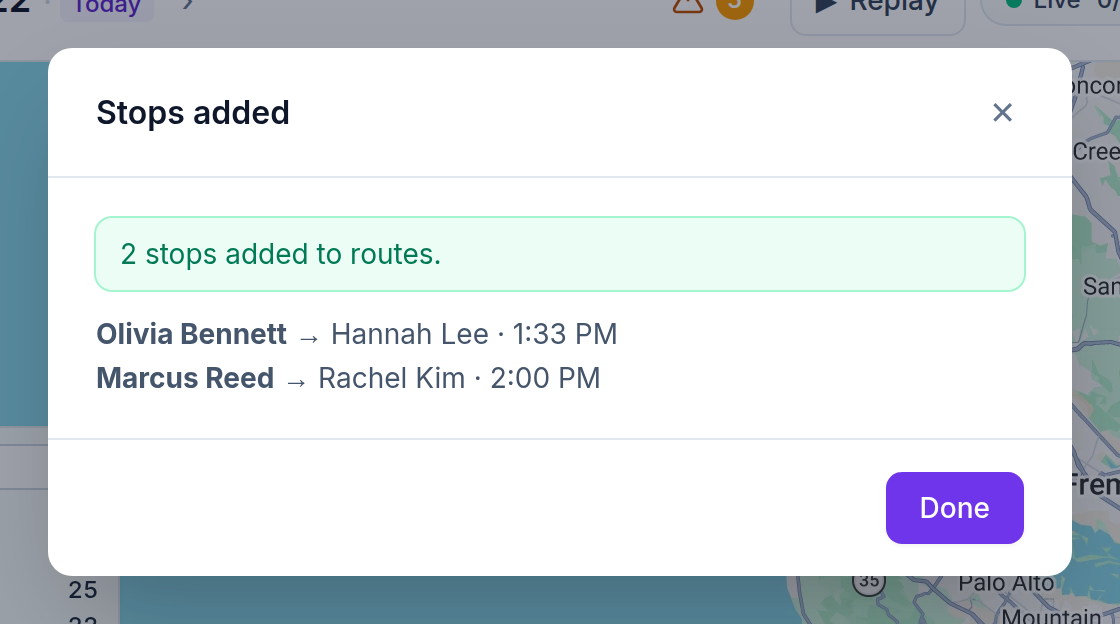
An order added to a day whose routes were already sent starts with “Pick up at: depot” (switch it off when the parcel is already in a van). It is planned as a pickup at the depot followed by the delivery, on the same route, so the drive back to the depot is part of the time Afi Planner checks. The result lists where each order went and when it will arrive.
- The board marks the stop “Needs pickup at depot” until the driver has it
- The driver app shows a “Pick up at the depot first” card; the driver taps “I have it” once it is loaded
- Parcels already in a van that left go only onto that van’s route
- “Pick up at” can also be a driver’s own start, a saved pickup place or any other address
Drivers hear once, when you are ready
Drivers keep the route they have until you click Send updates. Then each driver on the app gets one notification saying how many stops were added or removed, and the replay of the day shows the routes before and after.
Try it in the live demo
A fictional delivery company in the middle of its day. Read-only, no sign-up.
Open the live demo →Feature
Dispatch & live tracking
Send routes to drivers in one click, follow every van on a live map, and get warned before a delivery runs late. Live ETAs from driver GPS and a “Needs attention” inbox your whole team shares.
12 steps · 6 min read
How to optimize routes and adjust them by hand
Frequently asked questions
Will the other stops be reshuffled?
Not with Fewest changes: the new order is slotted in and the other stops keep their order. Choose “Add, then re-order those routes” if you want the routes that took a stop put in the best order again; the other routes do not change.
What if no driver can take the order on time?
It stays off the routes with the reason. You can then allow late arrivals, give it to one driver, or move it to another day.
Can orders arrive from our store or ERP during the day?
Yes. Orders created through the API for today appear under “New since planning” like any other, and the API’s pickupAt field accepts “depot”, a saved pickup place or an address.
More answers
- How can I see exactly what happened on a delivery day, minute by minute?
- Is there one list of everything a dispatcher needs to act on during the day?
- Can my customers track their delivery with a live ETA and see proof of delivery?
- Does the driver app work without a signal?
- How do I import delivery orders from Excel or CSV without mixing up the dates?
- Does Afi Planner have an API with webhooks?
Plan tomorrow’s routes in the next 3 minutes
Start your free 3-month trial. No credit card, no setup call, no installation.